
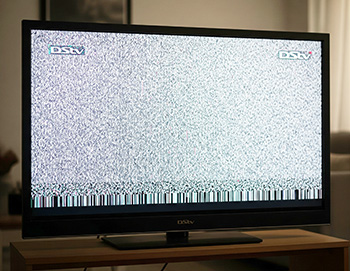
 When your DStv signal or reception suddenly drops or your decoder won’t power on, it can be frustrating—especially when you just want to kick back and enjoy your favourite shows. Often, the root causes are surprisingly simple to fix with a little know-how and some basic tools. In this guide, we’ll walk you through essential troubleshooting steps focusing on DStv coaxial cable inspection and replacement, dealing with signal loss after storms, how to reboot and reset your DStv decoder, ways to protect your decoder from power surges and load shedding damage, and when it’s wise to call in a professional DStv repair service.
How to Inspect and Replace Damaged DStv Coaxial Cables
One of the often overlooked culprits behind DStv signal problems is a damaged or faulty coaxial cable. These cables connect your satellite dish to the decoder and carry the vital signal, so any breaks, bends, or corrosion can cause interruptions. Over time, weather exposure, pets, or even rodents can damage the cable, leading to pixelation, freezing, or a complete “No Signal” error.
Start by visually inspecting the cable from the dish to the decoder. Look for cracks, splits, or obvious wear, especially near connectors where strain is highest. If you notice any exposed wiring or the cable sheath peeling off, it’s time for a replacement. Even if it looks okay, gently wiggle the cable near connectors to see if the signal cuts out—this can indicate internal breaks.
Replacing a DStv coaxial cable isn’t complicated but requires care. Use high-quality RG6 coaxial cable designed for satellite TV signals to ensure minimal loss. When replacing, disconnect both ends—usually the satellite dish and decoder—then attach the new cable using suitable connectors, making sure they’re tightly screwed to avoid loose connections. Proper cable routing, avoiding sharp bends and securing with clips, will help prevent future damage.
What to Do When DStv Signal Is Lost After Bad Weather or Storms
South African weather can be unpredictable, and severe storms often cause temporary disruptions in your DStv signal. Heavy rain, hail, or strong winds may misalign your dish, damage cables, or cause moisture to seep into connections, all of which can cause signal loss.
If your signal drops after a storm, first check the obvious: look for visible damage to the dish or cables and clear any debris or leaves that might be blocking the line of sight. Sometimes water trapped in connectors can cause short circuits or signal degradation, so drying and resealing these connections with waterproof tape can help.
If everything looks intact but the problem persists, a simple reboot of your decoder can reset the system and restore the connection. However, if the dish has been knocked out of alignment by wind or there’s physical damage, you’ll likely need a professional installer to realign or replace affected components.
How to Reboot and Reset Your DStv Decoder to Fix Signal Problems
When your DStv decoder acts up—whether freezing, showing errors, or losing signal—sometimes all it needs is a quick reboot or reset. Rebooting simply means turning the decoder off and back on, which clears temporary glitches and refreshes the signal. To reboot, switch off the decoder at the remote or power button, wait about 30 seconds, then power it back on. This often solves minor problems like buffering or unresponsive menus. If issues continue, performing a reset can restore factory settings and clear deeper software bugs.
There are two common types of resets: soft reset and factory reset. A soft reset, accessible via your decoder’s settings menu, resets system processes without erasing personal data. Factory reset is more drastic, wiping all your settings and recordings and should only be done if all else fails. Remember to backup any important recordings or settings before a factory reset. Regular reboots and occasional resets keep your decoder running smoothly and prevent frustrating signal interruptions.
How to Protect Your DStv Decoder from Power Surges and Load Shedding Damage
Load shedding and power surges are a reality for many in Pretoria and across South Africa, and they can wreak havoc on your delicate DStv decoder equipment. Sudden power cuts or voltage spikes during outages can cause irreversible damage to the decoder’s internal circuits, sometimes resulting in a complete failure.
The best way to protect your decoder is to use a quality surge protector or an uninterruptible power supply (UPS). These devices shield your decoder from voltage spikes and provide a short buffer of power during outages, allowing you to safely shut down your equipment instead of it suddenly cutting out. Be cautious about plugging multiple devices into cheap power strips, as these often lack surge protection. Investing in proper electrical safeguards might seem costly upfront but can save you from expensive repairs or replacements down the line. Also, unplug your decoder during extended power outages if you don’t have surge protection.
Can Power Surges Permanently Damage My DStv Decoder, and How Do I Tell?
Yes, power surges can permanently damage your DStv decoder. When a surge happens, excess voltage can fry internal components, leaving the decoder unable to power on or operate correctly. Signs of damage include the decoder not turning on at all, random reboots, distorted display, or inability to access channels.
If your decoder is showing any of these symptoms after a known surge event, it’s likely the hardware has been compromised. Unfortunately, repairs aren’t always cost-effective, and you might need to replace the unit. Using surge protection and load shedding backups, as mentioned earlier, is your best defense against this scenario.
Common Causes and Fixes for DStv Decoder Not Powering On
If your DStv decoder won’t power on, several common issues could be the cause. First, check the power cable and outlet—sometimes it’s as simple as a loose plug or a tripped circuit breaker. Next, try a different power source or cable if possible. Internal hardware failures, caused by overheating, power surges, or component faults, are other culprits. In rare cases, the decoder’s power button might be faulty or stuck. If basic checks don’t help, a reset might revive your decoder, but if it still refuses to power up, professional repair or replacement is likely needed. Avoid opening the decoder yourself as this voids warranties and can cause further damage.
How Often Should I Update My DStv Decoder Software to Avoid Signal Issues?
Keeping your DStv decoder software up to date is vital for smooth operation and avoiding signal problems. Software updates improve system stability, fix bugs, and sometimes add new features or channels. DStv typically pushes automatic updates when your decoder is connected to the internet, but you can also manually check for updates in the settings menu. Doing this every few months or whenever you notice glitches helps maintain optimal performance. Ignoring updates might leave your decoder vulnerable to errors and incompatibility with broadcasting changes.
When to Call a Professional DStv Installer
While many simple issues can be fixed at home, there are times when calling a professional DStv installer is the best option. Complex problems like persistent signal loss despite good cable condition, dish misalignment, or damage caused by storms usually require expert tools and experience.
If your troubleshooting efforts don’t restore service, or if you’re uncomfortable climbing ladders or handling delicate satellite components, a professional can safely diagnose and fix the issue. They also offer guarantees on their work, providing peace of mind and ensuring your system runs reliably long-term.
Conclusion
Troubleshooting your DStv signal and decoder problems doesn’t have to be stressful or expensive. Regularly inspecting your coaxial cables, understanding how to reboot or reset your decoder, and protecting your equipment from power surges and load shedding can save you hours of frustration. Remember that weather-related issues are often temporary but may require professional attention if persistent.
By staying proactive and knowing when to call in a professional, you can keep your DStv setup running smoothly and enjoy uninterrupted entertainment, no matter the season or power situation. Keep these tips handy, and your next TV marathon will be all about the show—not the signal!
FAQs
- What type of connectors are recommended for replacing DStv coaxial cables?
Use high-quality F-type connectors designed for satellite TV to ensure a secure, weatherproof connection and minimal signal loss. Cheap connectors often lead to poor signal quality or loose connections.
- Are there specific brands of surge protectors or UPS devices that are recommended for DStv decoders?
Trusted brands like APC, Belkin, and CyberPower are popular for protecting DStv decoders from power surges and load shedding. They provide reliable voltage regulation and backup power.
- How can I tell if my DStv decoder’s internal components have been permanently damaged by a power surge?
If your decoder won’t power on, shows no lights, or acts erratically after a surge, internal damage is likely. A burnt smell or random reboots also signal possible permanent failure.
- What is the expected lifespan of a DStv coaxial cable installed outdoors in Pretoria’s climate?
Outdoor RG6 coaxial cables typically last about 5 to 7 years in Pretoria’s weather. Using UV-resistant and weatherproof cables helps extend their durability.
- Does the length of the coaxial cable affect signal quality, and is there a maximum recommended length?
Yes, longer cables cause signal loss; ideally keep runs under 30 meters. For longer distances, signal amplifiers or higher quality cables are recommended.
- How can I safely dry out and reseal DStv cable connections that have been exposed to moisture?
Disconnect and dry the cables thoroughly, then reseal with waterproof tape made for satellite cables to prevent moisture entry. Avoid using regular tape as it won’t protect effectively.
- Are there any visual indicators on the decoder itself that might suggest an internal hardware failure?
Blinking or no power lights, freezing on startup, or error codes on-screen can indicate hardware failure. Lack of response to the remote is another red flag.
- Does DStv offer any repair services for decoders damaged by power surges or load shedding?
DStv typically doesn’t cover damage from power surges or load shedding under warranty. Repair options may be limited, so replacement is often the best solution.
- What are the signs that a DStv decoder’s power supply unit might be failing?
Unexpected shutdowns, failure to power on, buzzing noises, or overheating suggest PSU problems. Addressing these early can prevent further damage.
- Is it necessary to unplug the LNB cable from the dish during severe thunderstorms?
Unplugging the LNB cable during storms isn’t mandatory but can protect your decoder from lightning damage. It’s a smart precaution in high-risk areas.
- What is the process for manually checking for DStv decoder software updates, and how long do they typically take?
Go to Settings > Software Update on your decoder and select Check for Updates; the process takes about 5 to 15 minutes. Ensure your decoder is connected to the internet for this.
- What are the potential risks or negative consequences of using generic, non-RG6 coaxial cable for DStv installations?
Generic cables often cause signal loss, pixelation, and interference due to poor shielding. Using proper RG6 satellite-grade cable ensures better and more stable signal quality.